 drive
driveFor delivery and rideshare drivers
Every mile is money. Keep it.
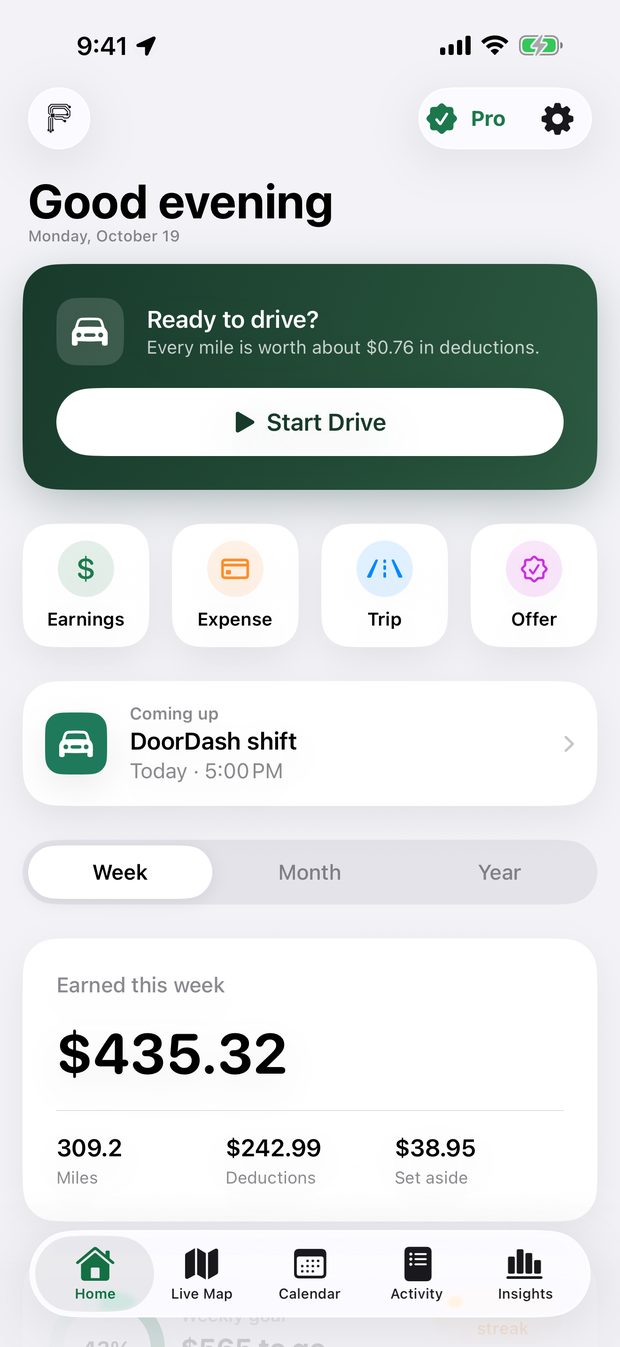
DriveKeep tracks your business miles automatically, tells you if an offer is worth taking, and works out what you owe the IRS and your state.
Coming soon to the App Store · iPhone & iPhone Duo
One email on launch day. No spam, and the list is deleted after.
Everything a gig driver needs
One app for the whole shift
Miles that track themselves
Free and unlimited. Starts when you start driving and stops when you park, with live miles on your Lock Screen, Apple Watch and CarPlay.
Take it or skip it
Screenshot an offer, or double-tap the back of your phone, and see your real pay per mile and per hour after gas.
Earnings without typing
Share your earnings screenshot, or let DriveKeep find it in your screenshots. It reads the amount on your phone.
A live map for drivers
Airport landing waves, when tonight's games and concerts let out, parking, gas, restrooms, ticketing and towing reports, and your best-paying areas.
Directions inside the app
Turn-by-turn directions with voice, without leaving DriveKeep, while it keeps counting your miles.
Calendar and reminders
Plan shifts, oil changes and tax dates. After each shift, a reminder to log what you made.
Ask DriveKeep
Pauram Intelligence answers "How much did I make on DoorDash last week?" from your own numbers, privately on your phone. Needs an iPhone with Apple Intelligence.
Taxes for all 50 states
Federal, self-employment, state and local tax. Each quarter, exactly what to pay the IRS and your state, with a button to pay. Plus a tax packet for your preparer.
Mileage deduction calculator
What are your miles worth?
Every business mile you log lowers your taxes. Most drivers forget a lot of them.
Taxes you could save
Estimated from 2026 self-employment tax (15.3% on 92.35% of profit) plus the 12% federal bracket. DriveKeep works out your exact number from your state and income.
Offer checker
Take it or skip it?
In the app, you screenshot the offer. Here, type it in. You get the same answer: your real pay per mile and per hour after gas and wear.
Try a real one
Take it
Uses 25¢ a mile for gas and wear and minimums of $1.50 a mile and $20 an hour. In the app you set your own car costs and minimums.
Inside the app
Built for the way drivers work
iPhone Duo
Unfold it. More map, more room.
On iPhone Duo, DriveKeep fills the big inner screen, with your tabs on the side like Apple's own apps. Fold it back up between deliveries and pick up where you left off.
2026 tax rules for all 50 states
It knows the taxes where you live
DriveKeep knows which state you're in from your location and uses its 2026 income tax rules, plus federal and self-employment tax. Pick a state to see what it uses.
Switching is easy
Bring this year's miles with you.
Coming from MileIQ, Everlance, Stride, Gridwise or Solo? Export your drives, choose the file in DriveKeep, and your year-to-date deduction carries over. Personal drives and duplicates are skipped for you.
- ExportDownload a CSV of your drives from your old app or its website. Most email it to you.
- ImportIn DriveKeep, open Activity → Import → From another app and choose the file.
- Keep drivingYour miles and deduction are there, and new drives track themselves, free.
| DriveKeep | Mileage-only apps | Earnings dashboards | |
|---|---|---|---|
| Free, unlimited mileage tracking | Yes | Often capped | Often paid |
| Offer check before you accept | Yes | No | Varies |
| Federal, state and local tax with pay links | Yes | Federal estimate | Varies |
| Airports, events and live map | Yes | No | Varies |
| No bank or gig-app login needed | Yes | Varies | Usually needed |
| Can't touch your driver account | Yes | Yes | Varies |
Free to start
Free to download. Pro when you're ready.
Pro is a monthly subscription that starts with a free week, or a yearly one with a launch price for the first year. Prices for your country are shown in the App Store.
Free
- Unlimited automatic mileage tracking
- 3 offer checks a day
- Federal, state and local tax, with IRS and state pay links
- Live map with airports and events, search and directions
- Calendar, reminders and widgets
- Import from other apps, and a free spreadsheet export
Pro
- Unlimited offer checks with Back Tap
- Insights, hot zones and Ask DriveKeep without limits
- IRS mileage log, Schedule C worksheet and a tax packet for your preparer
- Receipt photos for every expense
The Pauram promise
Your money. Your data. Your phone.
Questions drivers ask
How much does it cost?
DriveKeep is free to download and has a free plan. Pro is a monthly or yearly subscription with a free first week. You can cancel anytime in your Apple Account settings.
Is mileage tracking really free?
Yes. Automatic mileage tracking is free and unlimited on every plan, and you can export your records anytime. Pro adds unlimited offer checks, Insights and the PDF tax reports.
I already use another mileage app. Can I switch?
Yes. Export your drives as a CSV from MileIQ, Everlance, Stride, Gridwise, Solo or any spreadsheet, then choose it in Activity → Import. This year's miles and deduction come with you.
Can it get me deactivated?
No. DriveKeep never logs in to or controls your Uber, Lyft or DoorDash app. Offer checks read a screenshot on your phone, and you decide what to accept.
Does it drain my battery?
No. DriveKeep uses the phone's motion sensor to notice driving and only turns on GPS during a drive.
Which apps does it work with?
Any gig work you drive for, including Uber, Lyft, DoorDash, Instacart, Grubhub, Amazon Flex and Spark. DriveKeep isn't affiliated with any of them.
Do I have to type in my earnings?
No. Share a screenshot of your earnings to DriveKeep, triple-tap the back of your phone, or let DriveKeep find earnings screenshots for you. Everything is read on your phone.
Which iPhones does it work on?
Any iPhone with iOS 17 or later, including iPhone Duo, plus Apple Watch and CarPlay. Ask DriveKeep needs an iPhone with Apple Intelligence.
Is my data private?
Your records stay on your phone and in your private iCloud. No ads, no tracking, and we never sell your data.
Is this tax advice?
No. DriveKeep gives you estimates to plan with. Check with a tax professional before you file.
Does it work in Spanish?
Yes. The whole app, including reminders and Siri, works in English and Spanish.
Stop leaving money on the road.
Coming soon to iPhone and iPhone Duo.
One email on launch day. No spam, and the list is deleted after.